



In our efforts to make the use of our e-commerce system TriWeb as efficient and simple as possible, we are now launching an updated version. Based on specific customer requirements and the new opportunities the transition to our new ERP system has given us, TriWeb has been improved in a number of fields which we have listed below. Most functions are unchanged and the same goes for the layout. You use the same shortcut as always, and log on with your usual username and password. Enjoy!
Product search
When searching for a product, only categories within which there are parts for the selected car model will appear in black text (see green arrow). Categories in which there are no parts for a particular car is shown in a shaded grey color (red arrow).

The system now stores the latest 25 searches. The search history is connected to your login – i.e. no matter what computer you log into your personal search history will appear.

The fields “Product no.” and “OE / Ref. no” have been merged. Whether you are looking up a Triscan number, an OE number or a cross-reference, only this field is used.

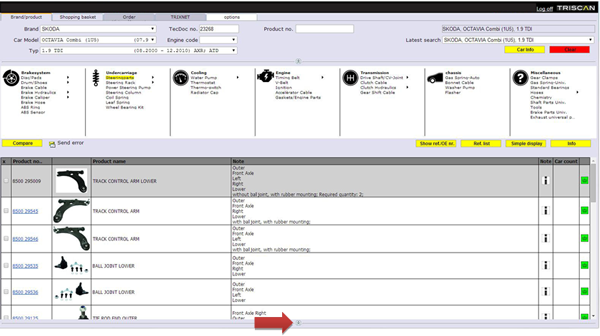
If you like to have more space to display the product lines, you have the option to minimize the search area by clicking on the small button with the double arrow. You can always switch back to the full search area by clicking on the button with the double arrow again.

Product overview
In the product overview, we have included sub-groups. Click on the small black triangle and the content of the sub-group is displayed.

Universal products have been moved into a separate product category, which is found to the right in the product overview.

Improved product line display:
- In the comment field criteria are listed more clearly
- We have added a Note column with two new icons
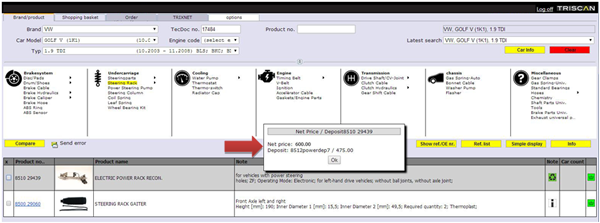
 Means that there is a deposit on the item. By clicking on the icon you will be quoted a net price and a deposit.
 By clicking on the icon you will be quoted a net price.
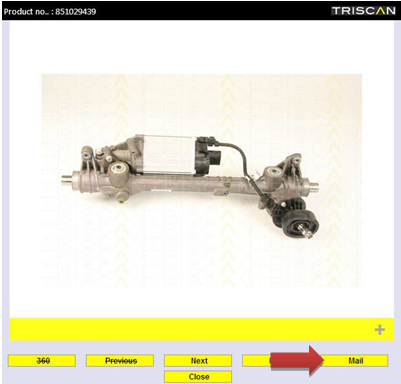
In the picture viewer we have added a mail button that allows you to send your customer a picture of the item.
Shopping basket
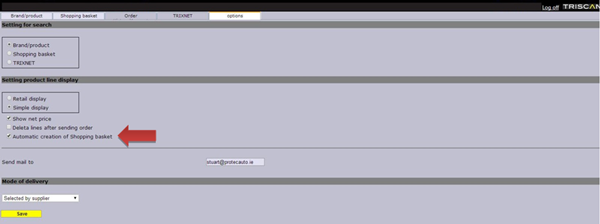
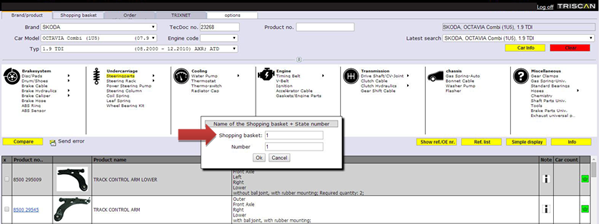
Another new feature is Automatic creation of Shopping basket. If you forgot to create a shopping basket manually before you started adding articles to your shopping basket, a shopping basket is automatically created. This feature can be turned on or off in the Settings tab. Turn on or off the check mark on or off next to automatic creation of shopping basket.
If you like to have more space to display product lines, you have the option to minimize the shopping basket by clicking on the small button with the double arrow. You can always get the shopping basket back by clicking on the button with the double arrow again.
Order history/account
In Order history/Account it is now possible to see date of order and mode of delivery.

Do you have any questions?
Should you have any questions, you are always welcome to call or email Henrik Akselbo at +45 2022 6466 / hea@triscan.dk